
Talk · Use · Everyday home & office use
Is it safe to charge earbuds on a high-wattage charger?
Yes, with a compliant charger. Earbuds draw only what they're designed for, usually at 5V. The charger's maximum rating doesn't push extra power into them.
 Wecent Editorial Team
Updated
3 min read
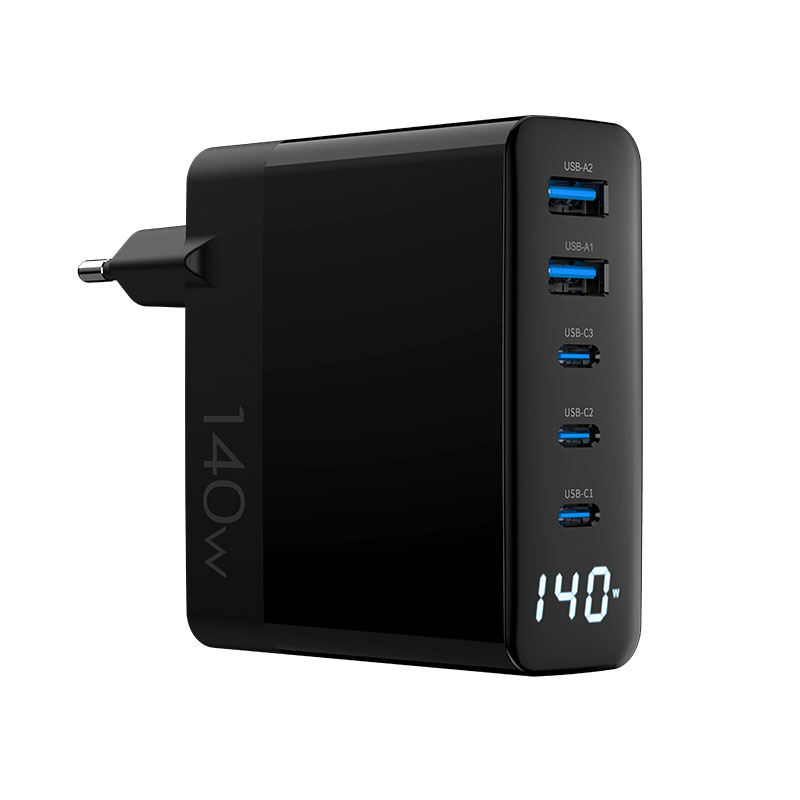
Customers worry about plugging their earbuds case into our 140W charger (WEG-140W-2A3C). Some say high-wattage chargers ‘fry’ small devices. Is that true?
Short answer: No, not with a compliant charger. The charger only offers voltages and currents; the device decides what to take. Earbuds cases usually charge at 5V and draw a small current, whether the charger is rated 20W or 140W. Higher voltages are only supplied after a USB PD negotiation, which earbuds that don’t support PD never request.
How small devices charge
USB chargers start at 5V on every port. A device that only supports basic charging takes 5V and the current it needs, which for earbuds is low. USB PD higher voltages appear only when the device negotiates them. A small accessory either doesn’t support PD or requests modest levels.
Why the myth exists
The fear dates from older or poorly made chargers without proper protection, or ones that didn’t follow standards. A certified charger regulates its output and has protections against overcurrent and overvoltage. That’s why the charger’s label rating is a maximum, not what it forces into the device.
Practical points
- Very low currents: some multi-port chargers may switch off a port when current is very low, thinking nothing is connected. Earbuds topping up near full may stop charging early as a result. Some chargers have a low-current mode; check the manual and confirm with Wecent for the specific model.
- Port choice: on chargers with USB-A, the A port is a natural choice for earbuds, leaving the C ports for phones and laptops.
- Power sharing: plugging in earbuds can still trigger a short renegotiation of other ports on some designs, briefly pausing a laptop. That’s not harmful.
- Cables: use a cable in good condition; the cable is more likely to be a problem than the charger.
What to tell customers
- “Each device takes only the power it needs. Earbuds, watches and phones are safe on this charger.”
- “If earbuds stop charging when nearly full, that’s the charger detecting a very small load. Unplug and re-plug, or use the low-current mode if available.”
What we don’t cover
Non-standard devices or cheap accessories that don’t follow USB specifications can behave unpredictably on any charger. We can only speak for compliant devices and chargers.
Where this answer says confirm with Wecent, the detail is not published on the product page and has to come from the datasheet or the factory. General facts come from the standards bodies, regulators or device makers named in the text.
Three more perspectives
Products discussed in this thread
Related articles & topics
Have a sourcing question about your own programme?
Ask our team More Everyday home & office use questions