
Talk · Use · Everyday home & office use
Can a 3-in-1 wireless charger run from a laptop USB port?
Usually not well. Most laptop USB ports supply far less power than a 3-in-1 charger needs. The charger may run slowly, charge only one device, or keep resetting. Use the recommended wall adapter.
 Wecent Editorial Team
Updated
3 min read
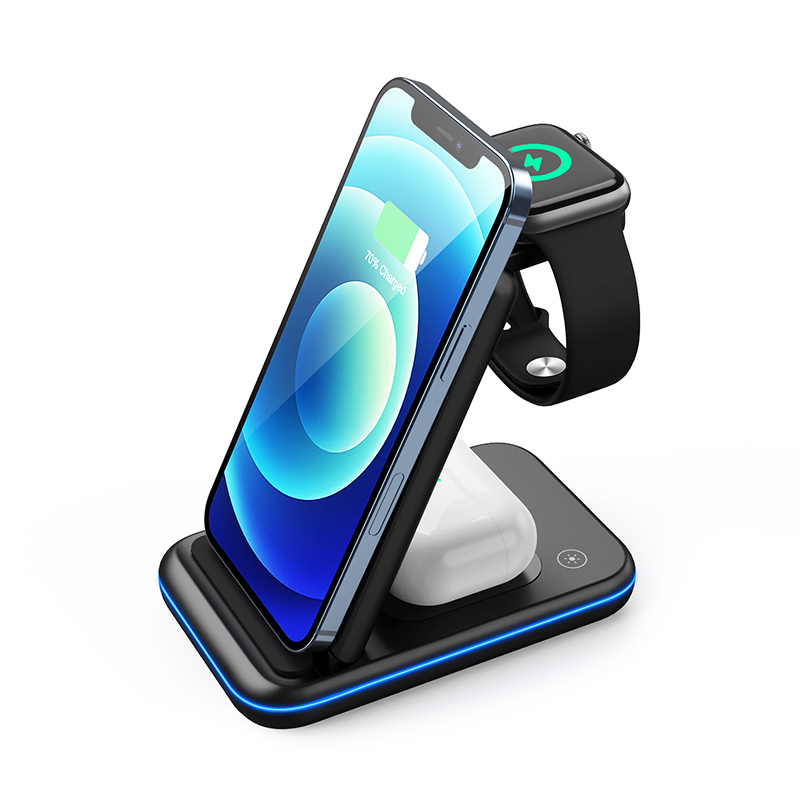
Customers plug our 3-in-1 wireless charger into their laptop’s USB-C port and complain that it barely charges. Is the laptop port the problem?
Short answer: Very likely. A 3-in-1 wireless charger needs enough input to drive three coils at once, and wireless charging loses some energy as heat. Many laptop USB ports supply only a limited amount of power, and some only offer basic USB power rather than higher USB-C PD levels. The charger may then charge slowly, power only one pad, or restart repeatedly. Recommend a wall adapter at or above the input rating printed on the charger or in its manual.
Why port power matters
A 3-in-1 charger is really three chargers sharing one input. Each pad draws power, and wireless charging is less efficient than a cable, so some of the input becomes heat in the coils. The charger’s input rating tells you what it needs to run all three pads at their intended speed. If the source can’t deliver that, the charger has to reduce output somewhere.
What laptop ports usually provide
Laptop USB ports vary widely. Some USB-A ports provide only basic USB power. Some USB-C ports support USB Power Delivery at modest levels, and only some laptops offer higher output from their ports. The exact figure is in the laptop maker’s specifications, not in the charger’s. Ports may also reduce output when the laptop runs on battery or goes to sleep, which explains why charging can stop overnight.
Typical symptoms
When input is too low, customers see slow charging, one pad working while others do nothing, the phone charging and stopping in a cycle, or indicator lights flashing a fault pattern. These symptoms look like a faulty charger, which leads to returns that aren’t really defects. Asking which power source was used is one of the first after-sales questions to ask.
What to recommend
Recommend a wall adapter that meets the input rating stated for the specific model, with a good-quality cable. If the charger ships without an adapter, say so clearly on the packaging and listing, and state the minimum adapter needed. If a bundle with an adapter is possible, it removes most of this confusion.
Is a laptop port ever fine?
For a single device on a simple pad, a laptop port can be enough for slow charging. For a 3-in-1 running a phone, watch and earbuds together, it is rarely a good choice. Some users accept slower charging at their desk, and that is their decision, but the listing should not suggest it’s the normal way to use the product.
Listing and manual wording
Put the input requirement near the top of the listing, not only in the specification table. A short line such as “use a wall adapter of at least the stated rating; computer USB ports may not supply enough power” heads off many complaints. Confirm with Wecent the input rating and recommended adapter for each 3-in-1 model.
Where this answer says confirm with Wecent, the detail is not published on the product page and has to come from the datasheet or the factory. General facts come from the standards bodies, regulators or device makers named in the text.
Three more perspectives
Products discussed in this thread
Related articles & topics
Have a sourcing question about your own programme?
Ask our team More Everyday home & office use questions