
Talk · Selection · Travel plugs, form factor & materials
How should a charger’s plug orientation be chosen: ports up, down or sideways?
Choose by how people will use it.
 Wecent Editorial Team
Updated
2 min read
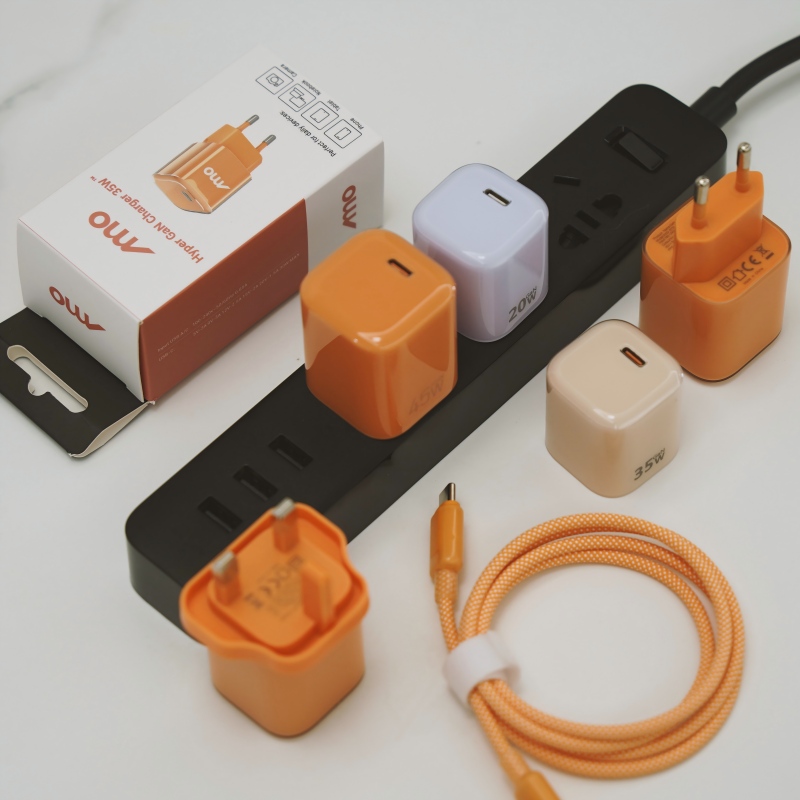
We are designing a wall charger. Should the ports face up, down or sideways relative to the plug blades?
Short answer: Choose by how people will use it. Downward-facing ports suit wall sockets where cables hang naturally, but may strain cables on a high socket. Ports on the side suit sockets with furniture in front. Test with typical sockets, power strips and cable weights, and choose the orientation that keeps cables low-stress and the charger stable.
What orientation affects
It decides how the cable leaves the charger, where its weight pulls, how the charger sits in a socket and whether it blocks the neighbouring socket.
Ports facing down
- Cable hangs under gravity, with a natural bend.
- Works well on wall sockets at normal height.
- On power strips, the cable can pull sideways.
- Can be awkward under a table.
Ports facing up
- Easy to plug in from above.
- Cable must bend back down, which can strain it.
- Dust and liquids can enter the ports.
- Not usually preferred for wall use.
Ports facing sideways
- Works for sockets close to furniture.
- Cable can lie along the wall.
- Adds width, and may block adjacent sockets.
- Suits travel chargers.
What to test
- Plug into wall sockets at different heights.
- Plug into power strips, including ones with close sockets.
- Hang cables of different weights, such as a laptop cable.
- Check whether the charger falls out of loose sockets.
- Check blocked neighbouring sockets.
- Observe how real users plug in and unplug.
Other points
- Stability. Heavy cables can pull the charger out of a loose socket. Consider shape and weight.
- Grip. A shape that is easy to hold helps removal.
- Logo and light. Make sure the display or light faces the user.
Choosing
For a general wall charger, downward-facing ports are most common. For travel and multi-port models, side ports may be better. Test both with prototypes before locking the tooling.
Quick summary
Choose by use, test with real sockets and cables and avoid strain on the cable and the socket.
Practical prototype test
Make quick 3D-printed or foam mock-ups of each orientation with a cable attached, and plug them into a wall, a power strip and a travel adapter. Watch for pull, blocked sockets and awkward angles. A day of mock-ups prevents a costly mould change after tooling is made and gives you pictures to share with the factory.
Where this answer says to confirm with Wecent, the detail is not published on the product page and has to come from the datasheet or the factory. General facts come from the regulators, standards bodies or device makers named in the text.
Three more perspectives
Products discussed in this thread
Related articles & topics
Have a sourcing question about your own programme?
Ask our team More Travel plugs, form factor & materials questions