
Talk · Selection · Travel plugs, form factor & materials
Which port layout should a travel charger have: 2C1A, 2C2A or 3C2A?
Match ports to the cables your customers actually carry and the devices they charge together. More ports means more power-sharing rules to explain.
 Wecent Editorial Team
Updated
3 min read
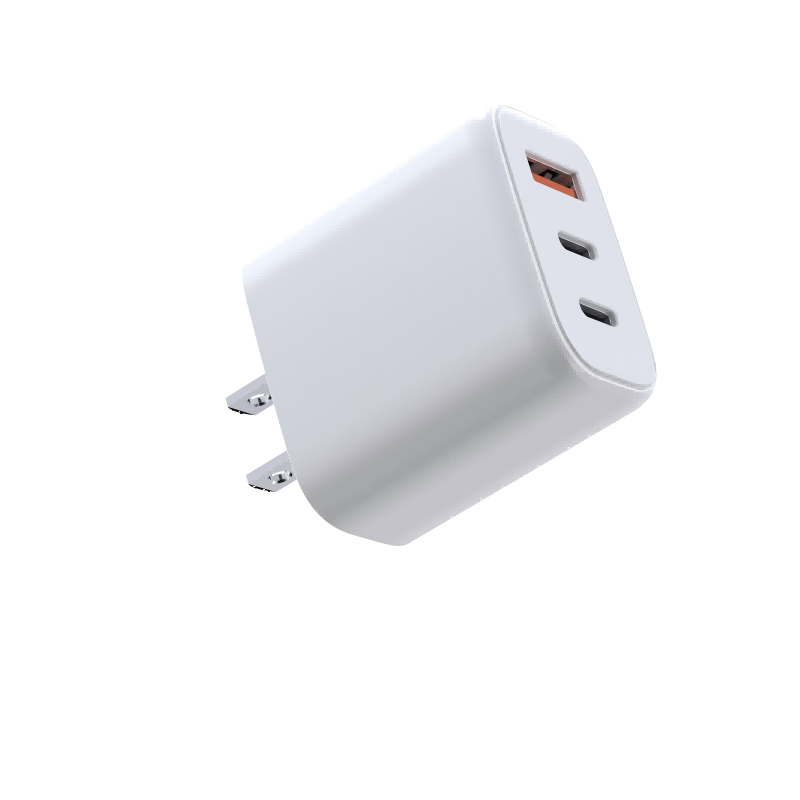
For a travel charger range we can choose between the WET-67-ACC (65W, 2C1A), the WEP-140-CCAA (140W, 2C2A) and the WEG-140W-2A3C (140W, 3C2A). How do we decide how many ports, and of which type?
Short answer: Count the devices a typical traveller charges at once and the cables they carry. Most travellers carry USB-C devices and a laptop, so two C ports matter most. A USB-A port helps with older accessories. More than three or four ports mainly suits shared desks or families, and makes power sharing more complex.
Why port count isn’t the whole story
Every port shares the charger’s total power. On a 65W 2C1A model, three devices together share 65W, so each gets less. A 140W charger with five ports has more to share, but five devices still divide it. The datasheet’s port-combination table tells you what each port gets in each case, and it is what customers experience.
USB-C or USB-A
- USB-C supports USB Power Delivery and is needed for laptops, current phones and tablets.
- USB-A suits older cables and accessories such as earbuds, watch chargers and power banks. It can’t carry USB PD, so it doesn’t fast-charge laptops.
Most new devices ship with USB-C to USB-C cables, so the share of USB-A use is falling. A single A port is still a useful fallback in a travel kit.
Matching layouts to customers
- 2C1A, 65W: solo travellers with a light laptop, a phone and one accessory. Compact.
- 2C2A, 140W: travellers with a larger laptop plus a phone and accessories, or couples sharing.
- 3C2A, 140W: desks, families or teams. Too big for many travellers, but strong as a single desk charger.
Size against port count
Each extra port adds to the housing size and to the internal power-management complexity. A 3C2A desk unit is too large for many carry-on kits, while a 2C1A unit fits in a pocket. Weigh the samples and measure them with the plug heads on; that’s what travellers notice.
What to check before choosing
- The port-combination table for each model. Confirm with Wecent for the exact firmware.
- Size and weight against your travel positioning, plus the plug system for each region.
- Which port gives full laptop power, and whether it is labelled on the housing.
On the listing
Show a simple table with total power, single-port maximum and two or three common combinations. That shows the customer what they are buying and reduces “it’s slower than advertised” returns.
Where this answer says confirm with Wecent, the detail is not published on the product page and has to come from the datasheet or the factory. General facts come from the standards bodies, regulators or device makers named in the text.
Three more perspectives
Products discussed in this thread
Related articles & topics
Have a sourcing question about your own programme?
Ask our team More Travel plugs, form factor & materials questions