
Talk · Troubleshooting · Wireless & magnetic faults
Why do RGB lights on a wireless charger flicker?
Brief flicker when a phone is placed or removed is often normal, because the charger adjusts power. Continuous flicker usually points to a weak adapter, a loose cable, a lighting mode, or a fault. Test with the recommended adapter before replacing.
 Wecent Editorial Team
Updated
2 min read
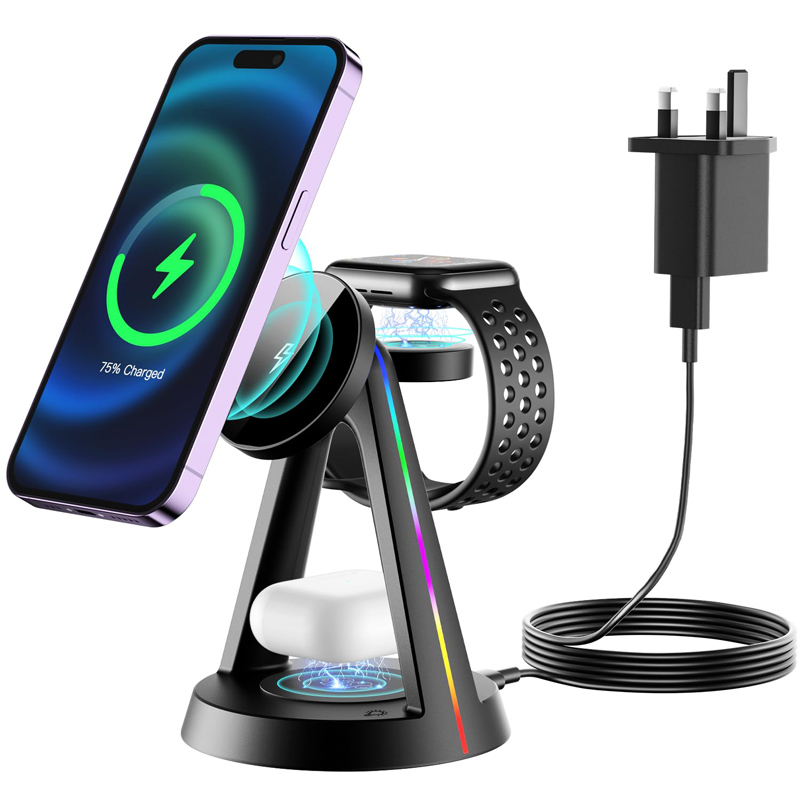
Customers report that the RGB lights on our wireless charger flicker. Sometimes only when a phone is placed, sometimes all the time. What’s going on?
Short answer: Several causes are common. A short flicker when a phone is placed or removed often reflects the charger renegotiating power or switching modes. Some lighting modes pulse or breathe by design. Continuous flicker often comes from an underpowered or unstable adapter, a loose cable, or a power strip; repeated flicker with charging stopping can mean the charger detects a foreign object. If it flickers with the recommended adapter, a good cable and no phone present, the unit may be faulty.
Normal behaviour
- On placement: the charger detects the phone, negotiates power and may change the light colour or briefly flash.
- Modes: breathing, pulsing or colour-cycling modes look like flicker to some users.
- Status signals: some chargers flash to signal errors or foreign objects.
Power-related flicker
LEDs and the wireless circuit share the input power. With a weak adapter, the voltage may dip when charging starts, causing visible flicker. Loose cables and overloaded power strips do the same. Use the adapter recommended in the manual and a good USB-C cable, plugged directly into a wall socket.
Foreign objects
Metal objects, card wallets or metal plates between phone and charger can trigger foreign object detection. The charger repeatedly stops and starts, and the lights flash. Remove accessories and check.
Alignment
A phone placed off-centre may cause the charger to repeatedly start and stop. Centre the phone or use magnetic alignment.
Tests
- Check the manual for the lighting mode in use and switch to a steady mode.
- Use the recommended adapter and a different cable.
- Plug directly into a wall socket.
- Remove the phone; does the flicker continue?
- Remove cases and accessories.
When it’s a fault
Continuous flicker with the right adapter and no phone, dead LED segments, or flicker together with heat or smell should be reported with the model and batch code. Heat or smell is a safety concern; stop using the charger.
Support script
Ask for a short video, the adapter model, and whether a phone was present. Most cases are adapters or modes.
Prevention
Bundle or clearly specify the adapter, and include a lighting mode guide in the box.
Where this answer says confirm with Wecent, the detail is not published on the product page and has to come from the datasheet or the factory. General facts come from the standards bodies, regulators or device makers named in the text.
Three more perspectives
Products discussed in this thread
Related articles & topics
Have a sourcing question about your own programme?
Ask our team More Wireless & magnetic faults questions