
Talk · Troubleshooting · Wireless & magnetic faults
Why does a foldable 3-in-1 charger stop charging one device?
Often it's placement, a case, a weak adapter, or power sharing. If one pad never works or cuts out when the panel moves, the hinge wiring or that pad's coil may be faulty.
 Wecent Editorial Team
Updated
2 min read
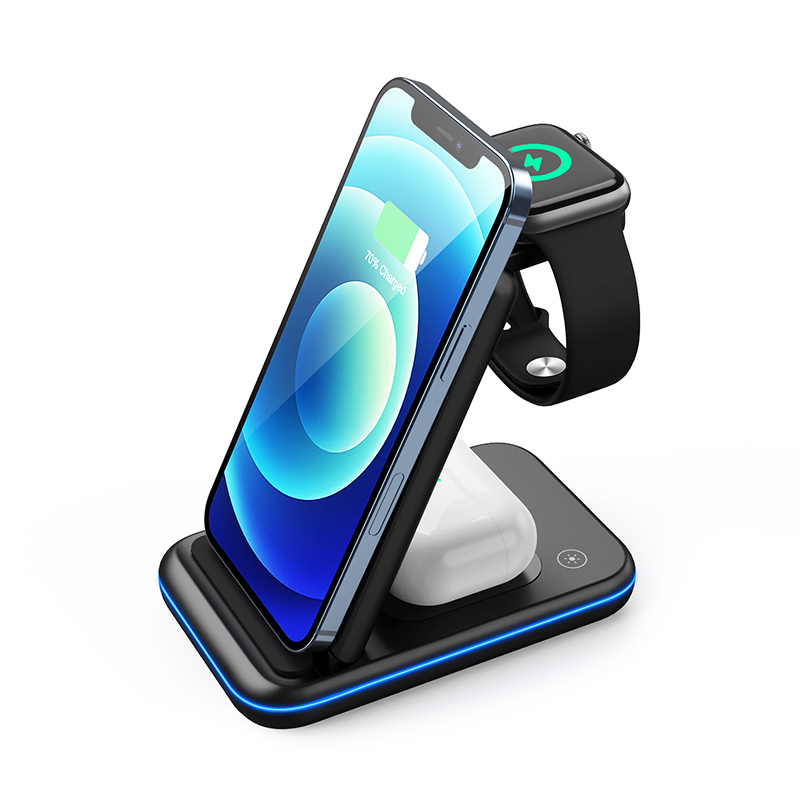
Customers say their foldable 3-in-1 charges the phone and earbuds but not the watch, or the reverse. What should we check?
Short answer: Start with the simple causes: the device isn’t centred on its pad, a case or band is in the way, the panel isn’t fully unfolded, or the adapter is too weak to power all three. For the watch, check model compatibility. If one pad never works with a compatible device, or charging stops when the panel is moved, the coil or hinge wiring for that pad may be faulty; report it with the model and batch code.
Placement and position
Each pad has its own coil. The device must sit centred on it. On foldable models, the panel must be in a supported position, often fully unfolded. A partly folded panel may not power its pad.
Cases and accessories
Thick phone cases, earbud case covers and watch cases block charging. Remove them and retry.
Adapter power
A 3-in-1 needs enough input power to run all three pads. With a weak adapter, the charger may disable one output or charge it slowly. Use the adapter recommended in the manual.
Watch compatibility
Watch modules support specific watch models. A newer watch may not charge on an older module. Check the compatibility list.
Device features
Optimised charging can pause the watch or earbuds when full or at 80%. That looks like “not charging” but is normal.
Hinge and coil faults
On foldable designs, wires to the coils pass through hinges. Repeated folding or forcing the panel can damage them. Signs:
- One pad never charges any compatible device.
- Charging cuts out when the panel moves.
- The pad works only at certain angles.
These point to a hardware fault. Stop using the faulty pad and contact the seller.
Test steps
- Unfold fully and place on a flat surface.
- Use the recommended adapter.
- Remove cases; place each device carefully.
- Test the problem pad with another compatible device.
- Move the panel gently while charging; does it cut out?
Earbuds
Earbud cases must have wireless charging to work on the earbud pad, and the charging side must face down. Some cases charge only when the lid is closed. Check the earbud maker’s guidance.
Support script
Ask for the device models, adapter, and a short video of the test. Replace units with confirmed pad faults and record the batch.
Where this answer says confirm with Wecent, the detail is not published on the product page and has to come from the datasheet or the factory. General facts come from the standards bodies, regulators or device makers named in the text.
Three more perspectives
Products discussed in this thread
Related articles & topics
Have a sourcing question about your own programme?
Ask our team More Wireless & magnetic faults questions