
Talk · Use · Everyday home & office use
Can two laptops share one 140W multi-port charger?
Usually yes, but each laptop gets its share, not 140W. Check the port table for the two-laptop combination before you promise it.
 Wecent Editorial Team
Updated
3 min read
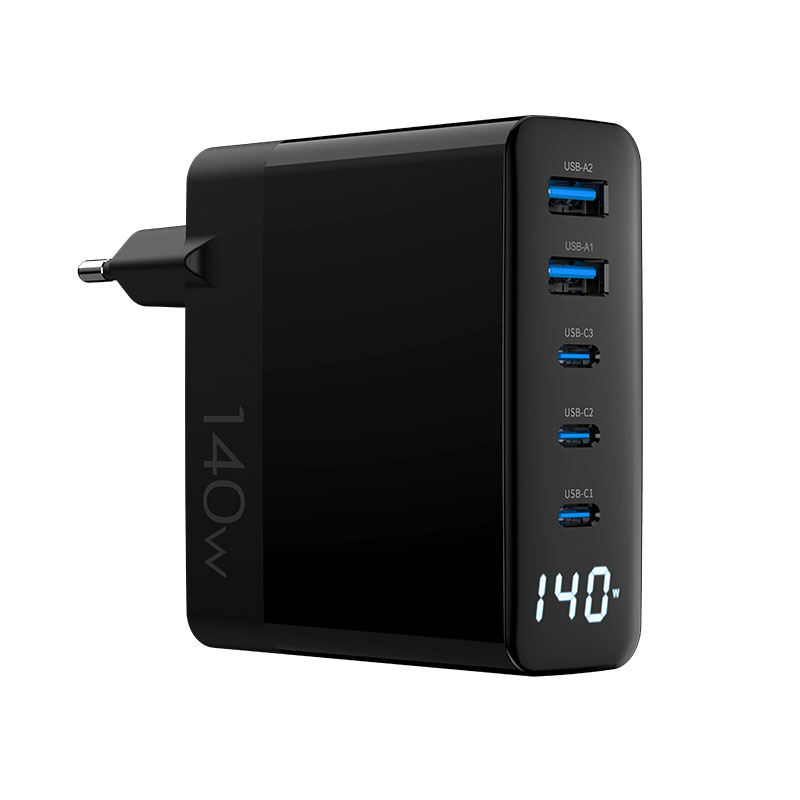
Couples and small teams ask whether one 140W charger (WEG-140W-2A3C or WEP-140-CCAA) can charge two laptops at once. What should we tell them?
Short answer: Often yes, at reduced power each. 140W is a total across ports. With two laptops connected, the charger assigns each USB-C port a share according to its port table, for example around 65W each or a larger and a smaller share. Whether that’s enough depends on the laptops. Check the model’s two-C-port combination in the datasheet.
How the split works
Multi-port chargers have fixed allocation tables. When two USB-C ports are used, the charger offers each a defined set of profiles. The exact values differ by model and firmware, so confirm with Wecent for your version. With other ports also in use, the shares change again.
Will it be enough?
- Two ultrabooks that charge at 65W or less: usually fine with a roughly even split.
- A 16-inch laptop with a small one: the large one may charge slowly if its share is below its needs.
- Two high-power laptops: a single 140W charger won’t feed both at full speed; consider two chargers.
Cables
Each laptop port above 60W needs a 5A e-marked USB-C cable. With two laptops, users need two such cables. A 3A cable on one port caps that port at 60W regardless of the allocation.
Phones on the remaining ports
Adding a phone on a USB-A port while two laptops are connected reduces the laptop shares on many designs. If users want laptops at full share, suggest charging phones elsewhere or after the laptops are full.
Heat
Two laptops drawing at once pushes the charger close to its full output for long periods. Keep it in open air. Some designs reduce output when warm, and that shows up as slower charging on both laptops.
What to publish
- The two-C-port combination from the datasheet.
- Which ports to use for laptops.
- The cable requirement for each laptop port.
When two chargers are better
If both laptops regularly work under heavy load, such as video editing or gaming, or one is a 16-inch model that wants 140W on its own, two chargers give each laptop its full speed. A shared charger suits light office work and overnight charging, when slower charging isn’t noticed.
Plug-in order
Connecting a second laptop can make the charger renegotiate with the first, causing a short interruption. That’s normal behaviour for many multi-port designs, not a fault. Tell users so they aren’t surprised.
Where this answer says confirm with Wecent, the detail is not published on the product page and has to come from the datasheet or the factory. General facts come from the standards bodies, regulators or device makers named in the text.
Three more perspectives
Products discussed in this thread
Related articles & topics
Have a sourcing question about your own programme?
Ask our team More Everyday home & office use questions