
Talk · Troubleshooting · Charging speed & compatibility
Why does a USB-A port charge slowly next to a USB-C port?
USB-A ports usually offer less power and different fast-charge protocols than USB-C PD ports. When both are used, many chargers share power and may drop fast-charge modes on the USB-A port. Slow USB-A charging is often by design.
 Wecent Editorial Team
Updated
3 min read
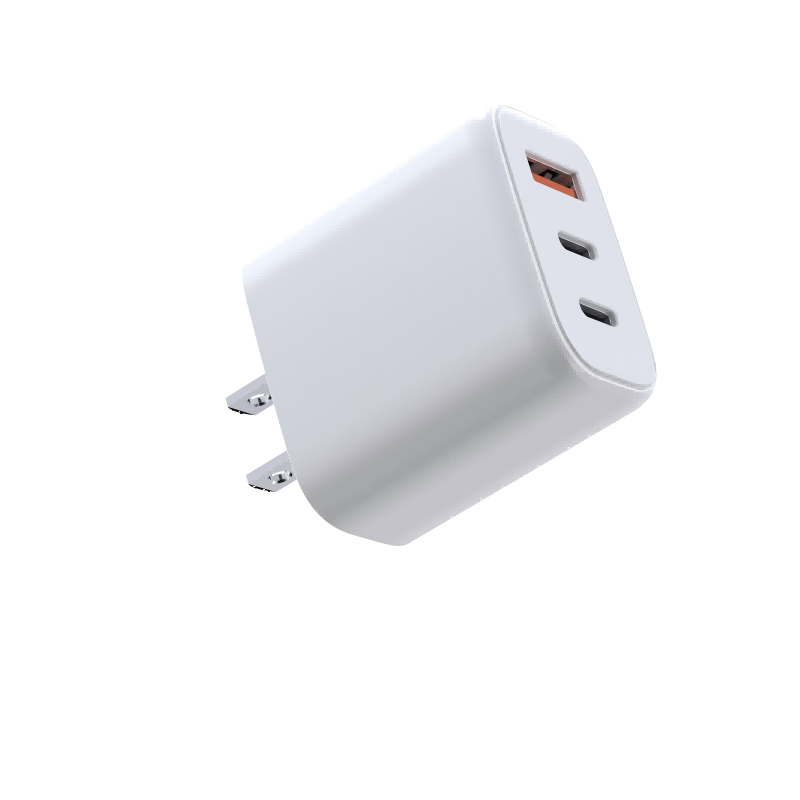
Customers say the USB-A port on our charger is slow, especially when a laptop is on the USB-C port. Is the USB-A port faulty?
Short answer: Usually not. USB-A ports often support lower power and different fast-charge protocols (such as Quick Charge or vendor protocols) rather than USB Power Delivery. When the USB-C port is in use, many multi-port chargers reduce the USB-A port to basic 5V output to protect the total budget and simplify negotiation. Check the port allocation table; for fast phone charging, use a USB-C port with a USB-C cable.
Different ports, different capabilities
USB-C ports on modern chargers use USB Power Delivery and can offer higher voltages. USB-A ports traditionally offer 5V, with some supporting fast-charge protocols at higher voltages. iPhones fast-charge via USB PD over USB-C; on USB-A they generally charge at standard speed.
Power sharing
Multi-port chargers have a total budget. When a laptop draws a lot through USB-C, the charger may reduce the USB-A port to 5V output, which can be 10–12W or less. Some designs also drop fast-charge protocols on USB-A when multiple ports are used, because handling several protocols at once is complex.
Cables
USB-A to USB-C cables vary in quality. Thin or long cables add resistance and reduce speed. A short, good-quality cable helps.
How to check
- Look at the port allocation table in the manual.
- Test the USB-A port alone, without the USB-C port in use.
- Try a different USB-A cable.
- For iPhones, compare with a USB-C to Lightning or USB-C to USB-C cable on a USB-C port.
Accessories that need USB-A
USB-A ports are still useful for earbuds, smartwatches, older phones and accessories with USB-A cables. These devices often charge at 5V anyway, so slower USB-A output makes little difference to them. Recommend the USB-A port for these and keep USB-C ports for phones, tablets and laptops.
When it is a fault
If the USB-A port charges very slowly even when used alone with a good cable and a device that supports its protocol, or doesn’t charge at all, report the model and batch code.
What to tell customers
“The USB-A port is designed for accessories and slower charging, especially when the USB-C port is in use. For fast phone charging, use a USB-C port.”
Listing guidance
Show the USB-A output in combination modes, not only alone. Customers compare their experience with what the listing says.
Confirm with Wecent the USB-A protocol support and output in each combination for each model.
Where this answer says confirm with Wecent, the detail is not published on the product page and has to come from the datasheet or the factory. General facts come from the standards bodies, regulators or device makers named in the text.
Three more perspectives
Products discussed in this thread
Related articles & topics
Have a sourcing question about your own programme?
Ask our team More Charging speed & compatibility questions