
Talk · Troubleshooting · Charging speed & compatibility
Why does a smart-screen charger show 0W while the device seems to be charging?
Low currents may display as zero, the screen may show another port, or the device may be idle or full. A frozen screen while charging normally is a display issue, not a power issue.
 Wecent Editorial Team
Updated
3 min read
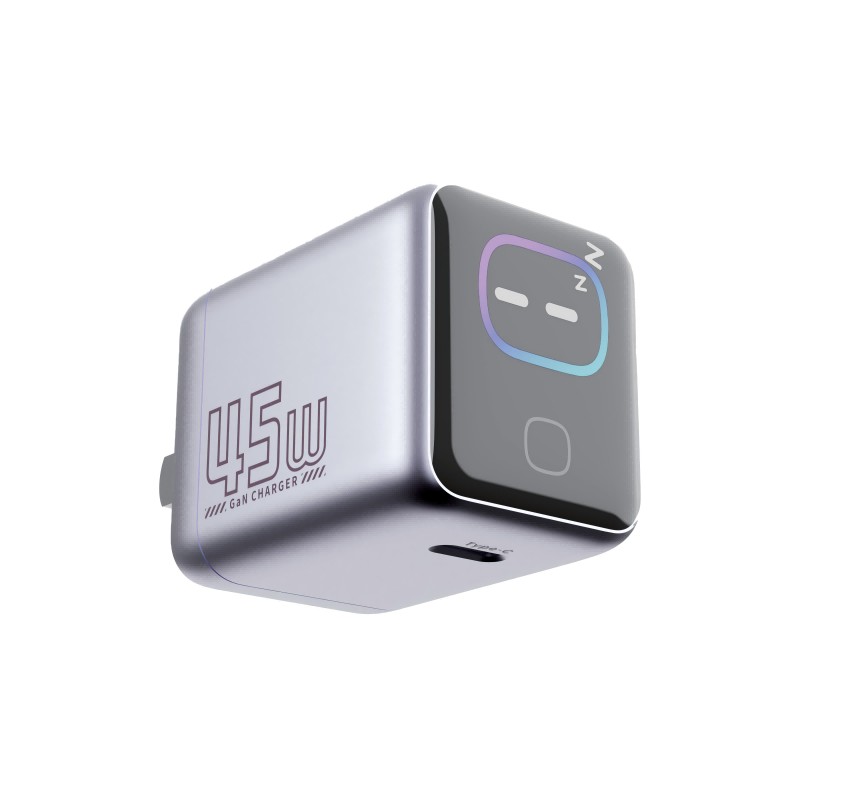
Customers with our WEX45Pro smart-screen charger say it sometimes shows 0W while their earbuds or phone seem to be charging. Is the display wrong, or is the charger not charging?
Short answer: Usually the display is behaving as designed. Very small currents, such as earbuds topping up or a nearly full phone, may round down to zero. The screen may be showing a different port. A full or sleeping device may draw almost nothing. Check on the device whether it is charging. If it is, and the screen shows 0W at higher loads too, treat it as a display fault.
Common reasons for a 0W reading
- Low current: small loads may fall below what the display resolves, so they show as zero or flicker.
- Port view: on multi-port models, the screen may show one port at a time or a total. Check which view is active.
- Full or idle device: a phone at 100% or earbuds in a full case draw very little.
- Charging paused: battery-care features can pause charging, for example holding at 80%.
- Display fault: rarely, the display module or its firmware misreads.
How to check
- Look at the device’s own charging indicator.
- Plug in a device that draws more, such as a phone at low battery. The screen should show a meaningful wattage.
- Check which port the screen is showing, using the manual’s description.
- Unplug the charger from the wall for a few seconds and plug it in again.
When it’s a fault
If a phone at low battery charges, confirmed on the phone, but the screen stays at 0W across ports and after a restart, the display is probably faulty. If the device doesn’t charge at all, it’s a charging fault. Both are warranty cases, but they need different handling, so note which one it is.
What we don’t know
Wecent’s product pages don’t state the display’s resolution, minimum displayed current or update rate. Ask Wecent for the display specification before writing FAQ answers with specific thresholds.
Accuracy questions
Users sometimes compare the screen with a USB meter and see differences at low loads. Small differences at low current are expected on most built-in displays. Larger, consistent gaps at high loads are worth reporting to Wecent with the meter readings.
Set expectations in the manual
A sentence like “Very low charging currents may display as 0W” removes most of these questions. Users accept limits they’re told about in advance.
Where this answer says confirm with Wecent, the detail is not published on the product page and has to come from the datasheet or the factory. General facts come from the standards bodies, regulators or device makers named in the text.
Three more perspectives
Products discussed in this thread
Related articles & topics
Have a sourcing question about your own programme?
Ask our team More Charging speed & compatibility questions