
Talk · Maintenance · Stock, warehouse & retail handling
How do we care for a smart-screen charger’s display?
Clean the display with a dry or barely damp soft cloth after unplugging, avoid solvents and pressure, keep it out of direct sun, and report a display that stays blank or shows garbled readings.
 Wecent Editorial Team
Updated
3 min read
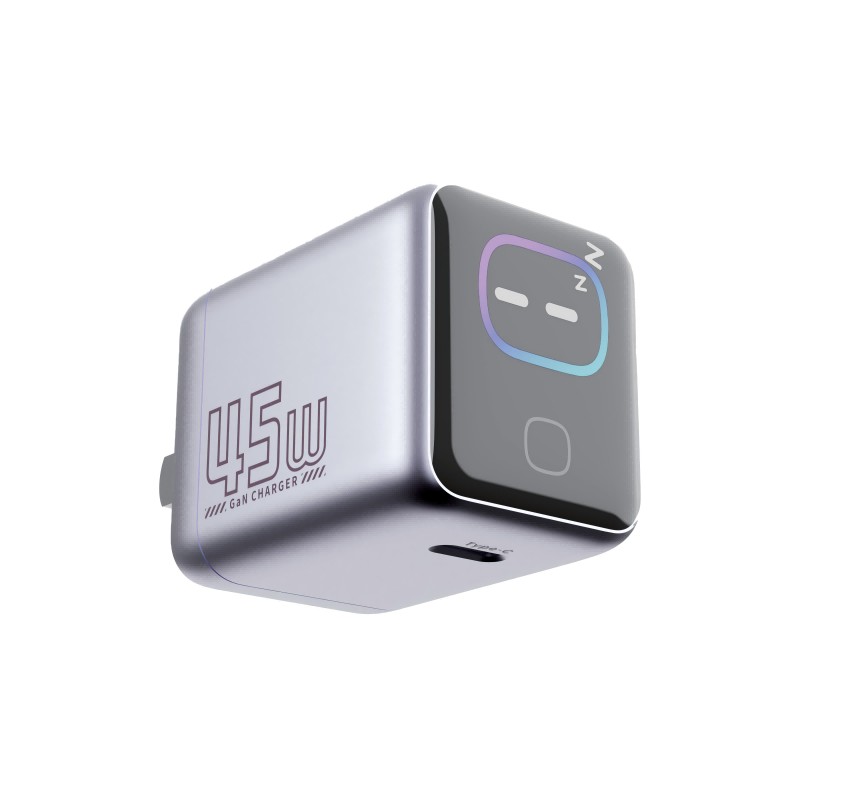
We sell a GaN charger with a small screen that shows wattage. Customers ask how to clean it, and a few say the screen went dark. What should we tell them?
Short answer: Unplug the charger, then wipe the screen with a dry soft cloth; if needed, use a cloth very slightly damp with water and let it dry fully before plugging in. Don’t use solvents, sprays or abrasive cloths, and don’t press hard. If the screen stays blank while the charger still charges, or shows clearly wrong readings, report it with the batch code.
Cleaning
- Unplug the charger from the wall and disconnect all cables.
- Wipe the screen gently with a dry microfibre cloth.
- For marks, use a cloth that is barely damp with water, never wet. Don’t let moisture reach the seams or ports.
- Let it dry completely before plugging it in.
Avoid alcohol, glass cleaner, solvents, and paper towels, which can scratch some surfaces or damage coatings.
Protecting the display
- Keep it out of long periods of direct sun, which can make screens hard to read and adds heat.
- Don’t carry it loose in a bag with keys or coins.
- Use the pouch or box for travel if one is provided.
Understanding the readings
The wattage on screen is the charger’s own measurement and is an indication, not a calibrated meter. It goes up and down as the device’s battery management changes the request; drops near full charge are normal. Readings that jump between ports when a second device is connected also reflect normal power sharing.
When to report a problem
- The screen stays dark while the charger still charges.
- Readings are clearly impossible, for example far above the rated output.
- Cracks in the display or housing; stop using a cracked charger near mains parts.
- Flickering together with heat, smell or buzzing; unplug and stop using it.
What we don’t know
Wecent’s product pages don’t publish display brightness, lifetime or measurement accuracy. Confirm with Wecent before making claims about measurement accuracy or screen lifetime on your listing.
Software and modes
Some display chargers dim or turn off the screen after a while. Check the manual before treating a dark screen as faulty.
For support teams
Ask for a short video of the screen while charging a known device, plus the model and batch code. That usually shows whether the issue is the display alone or the charger.
Where this answer says confirm with Wecent, the detail is not published on the product page and has to come from the datasheet or the factory. General facts come from the standards bodies, regulators or device makers named in the text.
Three more perspectives
Products discussed in this thread
Related articles & topics
Have a sourcing question about your own programme?
Ask our team More Stock, warehouse & retail handling questions