
Talk · Selection · Wired GaN chargers: wattage, ports & protocols
How do we choose between a 140W 2C2A and a 140W 3C2A charger?
Both share 140W. A 3C2A adds a third USB-C port for another modern device but splits power more ways. Choose by how many USB-C devices users connect at once and what the laptop port gets in each combination.
 Wecent Editorial Team
Updated
3 min read
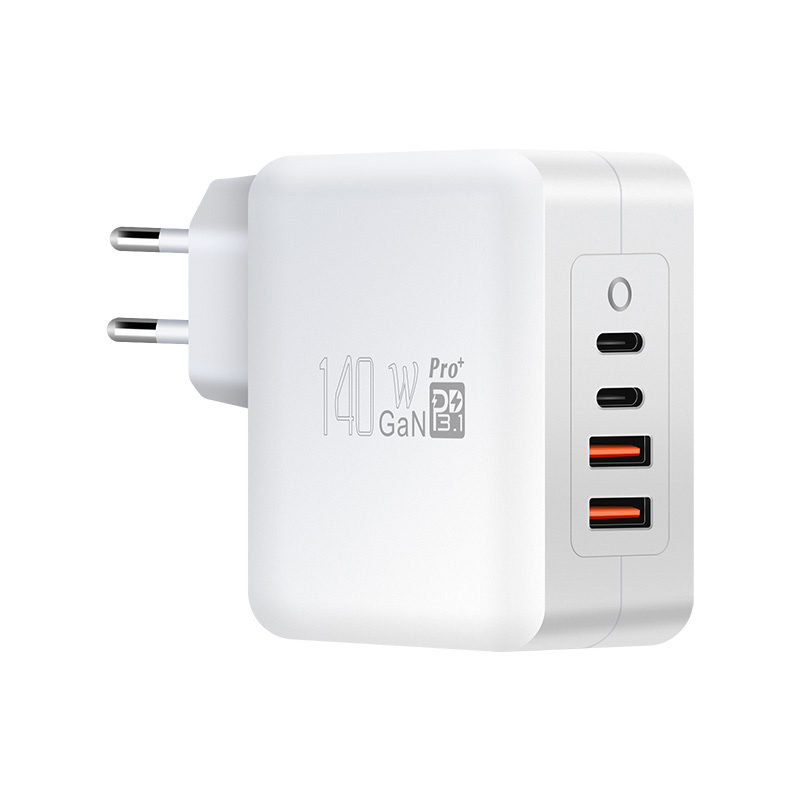
We’re deciding between Wecent’s 140W 2C2A and 3C2A desktop chargers. They have the same total. Which layout should we stock?
Short answer: Choose by the devices users connect. A 3C2A suits people with several USB-C devices, such as a laptop, tablet and phone, plus accessories. A 2C2A suits a laptop and phone with older USB-A accessories. Total output is the same, so more ports means a smaller share each when all are used. Compare the port allocation tables, especially what the main laptop port delivers when the other ports are busy.
Same total, different sharing
Both chargers share 140W among their ports. Adding a port doesn’t add power; it adds flexibility. When many devices are connected, each gets less. What matters is the allocation table: the outputs in each combination.
Who suits 3C2A
- Users with a laptop, tablet and phone, all USB-C.
- Small shared desks with several modern devices.
- Households moving fully to USB-C.
Who suits 2C2A
- A laptop plus one phone on USB-C, with earbuds, watches or older devices on USB-A.
- Users who prioritise maximum power on two USB-C ports.
Laptop priority
Check what the main USB-C port delivers when the others are in use. Some designs keep a high-power port for the laptop; others split more evenly. For laptops that need 100W or more, this matters more than the port count.
USB-A ports
USB-A ports usually supply lower power and may drop to 5V when USB-C ports are busy. They’re good for accessories. If users have no USB-A devices, extra USB-C ports are more useful.
Size and price
A 3C2A may be slightly larger or cost more. Compare dimensions and prices.
Range strategy
If you stock one, choose based on your buyers’ typical devices. If you stock both, describe them clearly: “for laptop + phone + accessories” (2C2A) and “for multiple USB-C devices” (3C2A).
EPR
If the 140W is available on a single port, check EPR support and the cable needed. Both layouts may differ here.
What to confirm with Wecent
Ask for the full allocation tables of both models, EPR support, size, price and plug options. Base the decision on the allocation table rather than the port count.
Test with real devices
Connect your target customers’ typical device set to both samples and observe the outputs. Real combinations tell you more than specifications.
Where this answer says confirm with Wecent, the detail is not published on the product page and has to come from the datasheet or the factory. General facts come from the standards bodies, regulators or device makers named in the text.
Three more perspectives
Products discussed in this thread
Related articles & topics
Have a sourcing question about your own programme?
Ask our team More Wired GaN chargers: wattage, ports & protocols questions